The Role of SDKs in App Development: 2026 Guide

An SDK, or software development kit, is a pre-packaged collection of libraries, documentation, and tooling that lets developers build, test, and optimize applications for specific platforms or services. The role of SDK in app development goes far beyond wrapping a raw API. SDKs like the iOS SDK, Stripe SDK, and Slack Bolt package entire developer workflows, including authentication, retry logic, typed schemas, and debugging tools, into a single installable dependency. The result is faster onboarding, fewer integration errors, and more consistent code across teams. This guide breaks down how SDKs work, what separates them from raw API calls and webhooks, and what their adoption means for your architecture and release strategy.
What does an SDK actually contain?
SDKs are pre-packaged collections of libraries, documentation, and tooling that speed implementation and reduce integration friction. Each component in that package serves a distinct purpose, and understanding what you are installing changes how you use it.
- Core libraries. These wrap low-level API calls into typed, higher-level methods. Instead of constructing raw HTTP requests, you call "stripe.charges.create()
orslack.client.chat_postMessage()`. The library handles serialization, headers, and error parsing. - Documentation. Documentation quality determines whether integration takes days or months. SDKs with inline code samples, searchable references, and versioned changelogs cut onboarding time significantly compared to those with only a PDF spec.
- Code samples and starter projects. Most mature SDKs ship with runnable examples. The Stripe SDK, for instance, includes sample apps for subscriptions, one-time payments, and webhook handling. These reduce the gap between "installed" and "working."
- Debugging and testing tools. The iOS SDK bundles Instruments for performance profiling and Simulator for device testing. The Stripe SDK provides a test mode with predictable card numbers. These tools let you validate behavior without touching production systems.
- IDE plugins and CLI tools. Many SDKs extend into the editor. The AWS SDK ships with CLI tooling that lets you scaffold, deploy, and inspect resources without leaving the terminal.
Pro Tip: Before adopting any SDK, check the date of its last commit and whether its documentation includes a migration guide between major versions. An unmaintained SDK with no upgrade path is a liability, not an asset.
The combination of these components is what makes SDKs more than API wrappers. They package the entire developer workflow, from first call to production deployment, into a tested, repeatable structure.
How SDKs simplify integration compared to raw APIs
The difference between using an SDK and calling a raw API is the difference between driving a car and assembling one. Both get you to the destination, but the effort and error rate are not comparable.

When you call a REST API directly, you write the authentication logic, handle token refresh, manage retry behavior on 429 or 503 responses, parse error codes, and validate field names manually. SDKs handle authentication, retries, and typed schemas automatically, eliminating entire categories of bugs before you write a single line of business logic.
Consider Stripe payments as a concrete example. A raw API integration requires you to construct signed requests, handle idempotency keys, parse nested error objects, and write your own retry logic for network failures. The Stripe SDK reduces this to a single method call with typed parameters and structured exceptions. The SDK also updates its error handling when Stripe changes its API, so your code stays current without a rewrite.
| Integration method | Authentication | Error handling | Type safety | Maintenance |
|---|---|---|---|---|
| Raw REST API | Manual, custom code | Custom parsing | None by default | Full ownership |
| SDK | Built-in, auto-refreshed | Structured exceptions | Typed methods | Vendor-managed |
| Webhook only | N/A (inbound) | Manual validation | None | Partial |
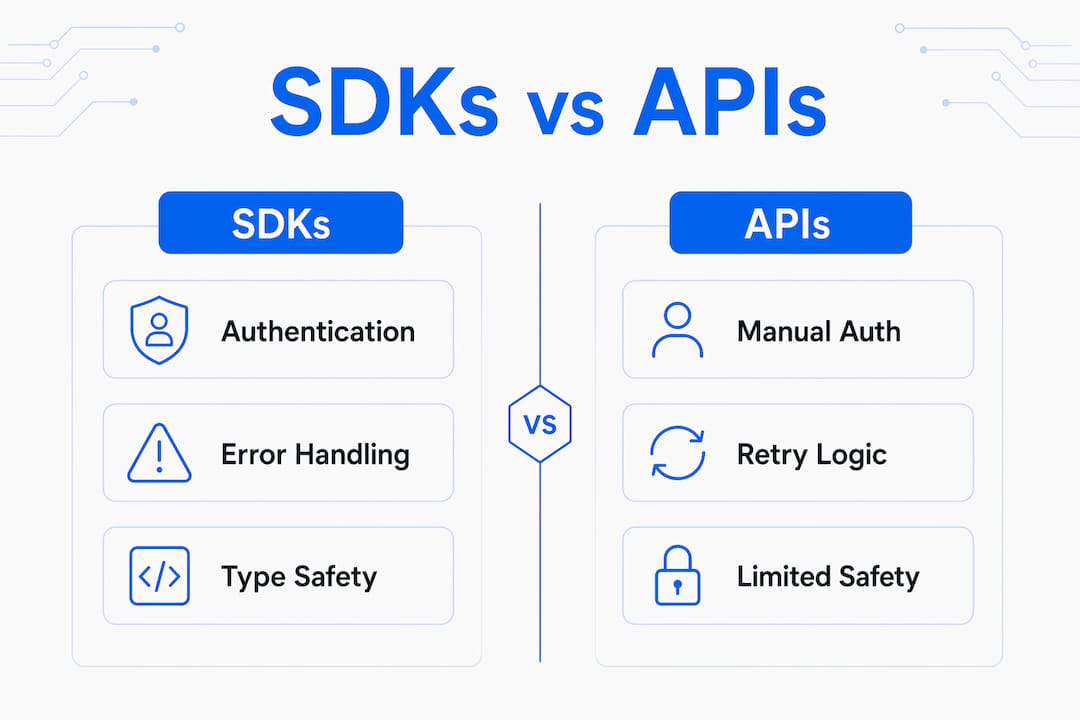
SDKs provide better security defaults than raw API integration by handling signature verification and token refresh out of the box. This matters most in regulated environments where a missed token rotation or unverified webhook payload creates a real vulnerability.
Pro Tip: When evaluating an SDK for a third-party service, test its error handling before you test its happy path. Fire a bad request, revoke a token mid-session, and simulate a timeout. How the SDK surfaces those failures tells you more about its quality than any benchmark.
The practical implication for project managers is direct: SDK-driven integrations carry lower ongoing maintenance costs and shorter time-to-first-working-call than raw API approaches. That trade-off is worth quantifying in your sprint planning.
What advanced SDK features enable complex app behavior
Not all SDKs are simple wrappers. The most capable ones provide architectural patterns that shape how your entire application is structured. Understanding these patterns is what separates developers who use SDKs from developers who design with them.
Event-driven handler registration. Slack's Bolt SDK uses an event-driven listener pattern to organize incoming Slack events into typed, registered handlers. You register
app.message(),app.action(), andapp.shortcut()handlers, each scoped to a specific event type. This is structurally cleaner than a single webhook endpoint that branches on atypefield.Middleware and state management. Bolt's middleware chain lets you inject authentication checks, logging, and context enrichment before any handler fires. This mirrors Express.js middleware patterns and gives you a predictable execution order without writing a custom dispatcher.
Modular plugin architecture. Databricks' AppKit SDK uses a plugin-based modular architecture that manages backend lifecycle, telemetry, caching, and type generation as discrete plugins. Frontend React components consume REST and SSE APIs through these plugins, enforcing a strict contract boundary between layers. Integration bugs in this model often trace back to contract mismatches rather than implementation errors, which is a faster debugging path.
Deployment mode flexibility. Socket Mode in Slack Bolt lets your app receive events over a persistent WebSocket connection instead of a public HTTP endpoint. This removes the need for a publicly routable server during development and reduces network exposure in production. The trade-off is a persistent connection that requires monitoring for reconnect behavior.
Lifecycle management. Advanced SDKs expose startup and shutdown hooks that let you initialize database connections, warm caches, or register cleanup routines in a controlled sequence. This is critical for apps that need predictable resource management under load.
These capabilities explain why advanced SDKs provide event-driven orchestration that is impossible to replicate with simple webhooks. If your app needs real-time bidirectional interaction, middleware-based access control, or modular plugin extensibility, the SDK architecture is not optional. It is the foundation.
How SDK adoption affects your development team
Adopting an SDK changes more than your codebase. It restructures how your team works, how you release software, and where your debugging time goes.
- Decoupled release cadences. SDK-encapsulated domain logic enables faster iterations than monolithic app releases. When payment logic lives in the Stripe SDK and notification logic lives in a push SDK, you can update each independently without a full app release cycle. For mobile teams shipping to the App Store, this is a significant agility gain.
- Role specialization. SDK boundaries create natural ownership lines. One team owns the analytics SDK integration, another owns the authentication SDK. This reduces merge conflicts and clarifies accountability during incidents.
- Black-box debugging. The flip side of abstraction is opacity. When an SDK behaves unexpectedly, you often cannot step through its source. Teams that do not invest in SDK-level logging and monitoring discover this during production incidents, not during code review.
- Dependency and version management. SDK adoption requires careful dependency management to avoid transitive dependency conflicts and security vulnerabilities. On Android, dependency conflicts between SDKs sharing common libraries are a known source of build failures. Locking SDK versions and auditing transitive dependencies on a regular schedule is not optional.
- App size and startup performance. Each SDK adds binary weight and initialization time. Mobile apps that bundle ten SDKs without auditing their startup behavior often see cold start regressions. Profiling SDK initialization order and deferring non-critical SDKs to background threads is a standard mitigation.
For project managers, the practical guidance is to treat SDK selection as an architectural decision, not a library choice. The SDK selection impacts architecture and deployment strategy in ways that surface months after the initial integration. Build SDK evaluation criteria into your technical discovery process.
SDKs vs. webhooks: when does each approach win?
Webhooks and SDKs are not competing technologies. They solve different problems, and choosing the wrong one for your use case creates unnecessary complexity.
Webhooks are one-way push notifications. A payment processor sends a POST request to your server when a charge succeeds. Your server validates the signature and updates its database. This works well for simple, stateless event consumption where you control the receiving endpoint and do not need to send responses back to the originating system.
SDKs provide bidirectional, stateful interaction. When a user clicks a button in a Slack app, the SDK receives the action, routes it to the correct handler, and sends a response, all within a three-second acknowledgment window that Slack enforces. A webhook-only approach cannot manage this interaction pattern without significant custom scaffolding.
| Scenario | Best approach | Reason |
|---|---|---|
| Payment confirmation update | Webhook | One-way notification, no response needed |
| Interactive Slack app | SDK (Bolt) | Bidirectional, typed handlers required |
| CI/CD pipeline trigger | Webhook | Simple event, no state management |
| Real-time data query app | SDK | State, auth, and retry logic required |
| Third-party analytics ingestion | Either | Depends on volume and latency needs |
Security is another differentiator. Socket Mode removes the need for public HTTP endpoints, which reduces your attack surface compared to a webhook endpoint that must be publicly routable and protected against replay attacks. For internal tools or development environments, this is a meaningful security improvement.
The decision rule is straightforward. If your integration is stateless and one-directional, a webhook is sufficient. If it requires state, bidirectional communication, or complex event routing, use an SDK. You can find a deeper treatment of these patterns in this guide to REST API design best practices.
Key takeaways
SDKs accelerate app development by packaging authentication, error handling, and typed interfaces into tested, vendor-maintained components that reduce integration time and ongoing maintenance cost.
| Point | Details |
|---|---|
| SDKs package full workflows | Libraries, docs, samples, and debugging tools combine to cut onboarding from months to days. |
| SDKs outperform raw APIs | Built-in auth, retries, and type safety eliminate entire error categories that raw API calls expose. |
| Advanced SDKs shape architecture | Event-driven handlers and plugin systems like Slack Bolt and Databricks AppKit define app structure, not just connectivity. |
| SDK adoption has team implications | Decoupled release cycles and role specialization improve agility, but black-box debugging requires deliberate monitoring investment. |
| Webhooks and SDKs serve different needs | Use webhooks for stateless notifications and SDKs for bidirectional, stateful interactions requiring middleware and lifecycle management. |
Why I think most teams underestimate SDK architecture
Most developers treat SDK selection as a dependency decision. Pick the official library, install it, and move on. That framing misses the point entirely.
The SDKs you adopt define your application's architectural skeleton. Slack Bolt's middleware chain shapes how you handle access control. Databricks AppKit's plugin contracts determine how your frontend and backend communicate. These are not implementation details. They are load-bearing decisions that affect every developer who touches the codebase after you.
What I have found consistently is that teams who invest early in understanding an SDK's lifecycle model, its event routing patterns, and its versioning discipline ship more stable software than teams who treat the SDK as a black box. The documentation investment pays back in debugging time alone.
The uncomfortable truth is that most SDK-related production incidents I have seen trace back to one of three causes: an unread changelog that introduced a breaking change, a transitive dependency conflict that nobody audited, or a missing middleware that let unauthenticated requests reach a handler. None of these are hard problems. They are discipline problems.
My advice: treat your SDK integration layer as a first-class architectural concern. Document which SDK version you are on, why, and what the upgrade path looks like. Write integration tests that exercise the SDK's error paths, not just its happy path. And if you are evaluating a new SDK, read its system design fundamentals before you read its quickstart guide. The quickstart tells you how to install it. The architecture docs tell you whether it fits your system.
— Rishi
Plan your SDK-driven architecture before you write a line of code
Blueprintbot transforms your app idea into a detailed technical blueprint in seconds, including system architecture, API designs, and SDK integration patterns. Before your team commits to an SDK strategy, you can use Blueprintbot to map out how your chosen SDKs fit into your overall architecture, identify integration dependencies, and generate cost estimates. This is particularly useful when you are evaluating whether to use a modular SDK like Databricks AppKit or a simpler webhook-based approach. See how developers and product teams use Blueprintbot to plan SDK-driven apps on the Blueprintbot use cases page, or explore generated architecture examples to see what a complete blueprint looks like before development starts.
FAQ
What is the role of an SDK in app development?
An SDK provides developers with pre-packaged libraries, documentation, and tooling that handle authentication, error management, and typed API calls, reducing integration time and coding errors. It defines the structure of how your app communicates with a platform or service.
How is an SDK different from an API?
An API defines the contract for communication between systems. An SDK wraps that API with libraries, retry logic, type safety, and debugging tools that make the API practical to use in production code.
When should you use an SDK instead of a webhook?
Use an SDK when your integration requires bidirectional communication, state management, or complex event routing. Webhooks are sufficient for simple, one-way event notifications where no response to the originating system is needed.
What are the risks of adopting a third-party SDK?
The primary risks are transitive dependency conflicts, black-box debugging opacity, and breaking changes in major version updates. Locking SDK versions and auditing changelogs on a regular schedule mitigates most of these.
Which SDKs are considered best practice for mobile app development?
The iOS SDK and Android SDK are the platform-native standards. For third-party services, Stripe SDK for payments, Firebase SDK for real-time data and auth, and Segment SDK for analytics are widely adopted and well-maintained choices.