Common app launch failure reasons: a founder's triage guide

Most app launches fail for a short list of preventable reasons: scaling failures, configuration drift, third-party API breaks, app-store packaging errors, and last-minute process shortcuts. If your launch just broke, start here.
Immediate triage checklist (run these first):
- Check your error rate dashboard. A spike above 1% is your signal to consider rollback.
- Verify your deployment status. Confirm the correct build artifact reached production, not a staging build.
- Toggle your feature flags to safe defaults. Misconfigured flags are a silent killer.
- Open the Apple App Store Connect or Google Play Console for rejection messages or metadata warnings.
- Confirm your privacy policy URL is live and matches what you submitted. PIPEDA requires transparency about data collection before users interact with your app.
- Check third-party API status pages (payment gateways, auth providers, analytics SDKs). External failures look identical to your own.
Pro Tip: Set a 30-minute triage timer. If you cannot isolate the fault within that window, initiate rollback first and investigate second. Downtime compounds faster than debugging does.
Table of Contents
- 1. What actually breaks under launch load: technical root causes
- 2. Process failures and human factors that trigger launches to fail
- 3. Pre-launch validation checklist every founder should run
- 4. Deploy strategies, monitoring, and a quick incident playbook
- 5. Practical timelines and rough cost guidance for launch preparation
- 6. How Blueprintbot reduces your risk of a failed launch
- Key takeaways
- The part most founders skip
- Skip the guesswork on your next launch
- Useful sources and references
1. What actually breaks under launch load: technical root causes
Traffic spikes are the most common technical trigger. A platform that handles 50 concurrent users in staging can saturate its database connection pool at 500. The symptoms are latency spikes, growing request queues, and 503 errors that look random but are actually deterministic under load.

| Failure Category | Symptoms to Watch | Quick Mitigation |
|---|---|---|
| Scaling / load | Latency spikes, DB connection errors, queue growth | Auto-scaling rules, connection pooling, circuit breakers |
| CI/CD artifact mismatch | Wrong version in production, missing env vars | Build-once, promote artifacts; immutable release tags |
| Configuration / env drift | CORS errors, auth failures, feature flags misbehaving | Config validation gate in the deployment pipeline |
| Third-party API failures | 5xx spikes, third-party error headers | Circuit breakers, cached fallbacks, status-page monitoring |
| Certificate / signing errors | App rejected at store, TLS handshake failures | Automate cert rotation; validate signing before submission |
CI/CD problems are subtler. Reproducible build artifacts and immutable release tags prevent the classic "it worked in staging" failure, where a developer accidentally promoted a debug build or an artifact built against a different environment's secrets. Your deployment pipeline should build once and promote that exact artifact through every environment.
Security dependencies deserve a dedicated check. An unpatched critical CVE or an expired code-signing certificate can cause the Apple App Store to reject a binary outright, with no warning until submission day.
Pro Tip: Add a preflight smoke test as the final step in your CI/CD pipeline. It should hit three endpoints: health check, auth, and one core feature. If any fail, the deployment stops automatically.
2. Process failures and human factors that trigger launches to fail
Rushed timelines are the single greatest risk factor for technical errors. When a team compresses a six-week QA cycle into two, the casualties are always the same: regression suites get skipped, load tests never run, and app-store metadata gets copy-pasted without review.
Common process failure modes:
- Last-minute feature toggles pushed without a corresponding rollback plan
- Skipped sign-offs on app-store metadata, screenshots, or legal text
- Missing or placeholder privacy policy when the app collects any user data
- No PIPEDA compliance review before a Canadian launch
- Optional fields left blank in store listings, causing downstream data mismatches
The optional-field problem is underappreciated. Ignoring optional fields or using informal names creates data mismatches that block downstream processes. In app development, this translates directly: a missing app category, an informal developer name that does not match your legal entity, or a skipped age-rating questionnaire can all trigger a Google Play rejection.
Generic or sloppy submissions with missing required items are consistently cited as avoidable mistakes. Treat your app-store submission the same way: every required field, every screenshot dimension, every legal statement.
A short process checklist founders can adopt immediately:
- Assign a single release owner with authority to halt the launch.
- Set a metadata freeze date at least five business days before submission.
- Define acceptance criteria for QA sign-off in writing, not verbally.
- Name a rollback owner before the release starts, not after it breaks.
- Schedule a PIPEDA compliance review as a calendar event, not a to-do item.
3. Pre-launch validation checklist every founder should run
A structured checklist catches what memory misses. Use this with your technical lead or feed it directly into a Blueprintbot blueprint to generate the corresponding runbooks.
Pro Tip: Run your staging environment against production data volumes, not synthetic minimums. A staging environment seeded with a small sample of records will not reveal the query that takes a long time against a much larger production dataset.
- Staging parity: Confirm staging uses production-equivalent infrastructure, data volumes, and third-party credentials (sandbox, not mock).
- End-to-end tests: Cover auth flows, payment processing, and at least one complete user journey per core feature.
- Load test: Simulate 2x your expected peak concurrent users. Record P95 and P99 latency baselines.
- Chaos injection: Kill one dependency (database replica, third-party API) and confirm the circuit breaker activates.
- CI/CD artifact validation: Confirm the production artifact matches the staging artifact hash. Check immutable release tags.
- App-store packaging: Validate provisioning profiles and signing certificates for Apple App Store; confirm keystore integrity for Google Play. Verify all metadata fields, screenshots at required dimensions, and privacy policy URL.
- PIPEDA compliance: Confirm your privacy policy is publicly accessible, describes data collection accurately, and includes a contact method for user requests.
- Operational runbook: Document the incident owner, rollback steps, customer communication template, and monitoring dashboard URL before go-live.
| Checklist Area | Key Validation | Owner |
|---|---|---|
| Staging parity | Infrastructure and data volume match | Tech lead |
| Load test | 2x peak load, P95/P99 recorded | QA / DevOps |
| App-store packaging | Certs, metadata, screenshots, privacy URL | PM |
| PIPEDA review | Privacy policy live and accurate | Legal / PM |
| Runbook ready | Rollback steps documented | Release owner |
4. Deploy strategies, monitoring, and a quick incident playbook
Release controls shrink the blast radius when something goes wrong. The choice between canary releases, blue/green deployments, and feature flags depends on your risk tolerance and infrastructure maturity.
Release control options:
- Canary release: Route a small portion of traffic to the new version. Watch error rates for 15–30 minutes before expanding. Roll back by shifting traffic back to the stable version.
- Blue/green deployment: Run two identical environments. Switch the load balancer when the new environment passes smoke tests. Rollback is a single DNS or load-balancer change.
- Feature flags: Ship code dark, enable features for internal users first, then a percentage of real users. Safe default state means the flag is off until explicitly enabled.
Monitoring thresholds to set before launch:
- Alert when error rate exceeds 1% over a five-minute window.
- Alert when P99 latency exceeds 2,000ms.
- Alert when CPU or memory saturation exceeds 80% for three consecutive minutes.
- Alert on any third-party API returning 5xx for more than 60 seconds.
Incident runbook (abbreviated):
- T+0: Acknowledge the alert. Assign incident commander.
- T+5: Check error rate trend. If rising, initiate rollback immediately.
- T+15: If rollback is not viable, apply a targeted patch or disable the affected feature flag.
- T+30: Send a customer communication. One sentence: what is affected, what you are doing, when you will update.
- T+60: Post-mortem scheduled within 48 hours.
| Threshold Fires | Immediate Action |
|---|---|
| Error rate > 1% | Initiate rollback or disable feature flag |
| P99 latency > 2,000ms | Scale out, check DB connections, enable circuit breaker |
| Third-party 5xx > 60s | Activate cached fallback, notify vendor |
| CPU saturation > 80% | Auto-scale trigger, shed non-critical traffic |
5. Practical timelines and rough cost guidance for launch preparation
Buffer time is the cheapest insurance a founder can buy. Adding buffer room into timelines is the single most effective way to prevent deadline-related failures.
Lead-time tiers:
- 1–2 weeks (minimal): Smoke tests only. No load testing. High risk. Acceptable only for internal tools with fewer than 50 users.
- 3–6 weeks (recommended): Full QA cycle, one load test, app-store submission with review buffer. Covers most MVPs.
- 8+ weeks (safe): Two load test iterations, chaos testing, full PIPEDA review, external security scan, app-store re-submission buffer if rejected.
Rough cost buckets (estimates, not quotes):
| Activity | Rough Range (CAD) | Priority |
|---|---|---|
| Load testing tools and cloud credits | — | First |
| Code signing and certificates | — | First |
| External QA or security review | — | Second |
| App-store developer accounts | — | First |
| PIPEDA compliance legal review | $500–$2,000 | Second |
Pro Tip: Lock your feature set and metadata at least five business days before your target submission date. Every day of scope creep after that point adds disproportionate risk with no corresponding user value.
Use the app idea evaluation checklist to map these timelines to your specific release scope before committing to a date.
6. How Blueprintbot reduces your risk of a failed launch
Blueprintbot generates a complete software blueprint from a plain-language description of your app idea. The output includes system architecture, database schema, API specifications, UI flow wireframes, phased development roadmaps, cost estimates, and step-by-step publishing guides for both Google Play and the Apple App Store.
What a Blueprintbot blueprint includes to prevent launch failures:
- A preflight test list mapped to your specific architecture (auth, payments, core flows)
- A canary deployment plan with recommended traffic percentages and rollback triggers
- Alert threshold recommendations tied to your expected user volume
- A rollback runbook with named steps, not generic advice
- A PIPEDA compliance checklist for apps handling Canadian user data
- App-store packaging checklists covering provisioning profiles, metadata fields, and screenshot specifications
How to use a blueprint with your team:
- Share the blueprint with your developer or contractor before any code is written. It replaces the ambiguous brief.
- Use the runbook section as the acceptance criteria for QA sign-off. If the runbook step cannot be demonstrated, the feature is not done.
- Ask the Blueprintbot AI chat assistant to generate environment-specific configuration checklists or expand any section you need more detail on.
A blueprint can flag a certificate expiry date or a missing provisioning profile before you ever open App Store Connect, turning a submission-day crisis into a 10-minute fix.
Key takeaways
Most app launch failures are preventable when you address scaling, configuration, process discipline, and app-store packaging before release day, not after.
| Point | Details |
|---|---|
| Rollback first, debug second | Initiate rollback within 30 minutes of a confirmed failure to limit user impact. |
| Buffer time prevents most failures | A pre-launch window covering several weeks is recommended for QA, load testing, and app-store review for most MVPs. |
| Optional fields and metadata matter | Missing or mismatched store metadata causes rejections on both Apple App Store and Google Play. |
| PIPEDA compliance is non-negotiable | Any app handling Canadian user data needs a live, accurate privacy policy before launch. |
| Blueprintbot generates your runbooks | A Blueprintbot blueprint produces rollback steps, alert thresholds, and app-store checklists automatically. |
The part most founders skip
The failure modes covered here are not secrets. Every experienced engineering team knows about canary releases, load testing, and certificate rotation. The real problem is that non-technical founders and product managers have no reliable way to ask for these things by name, which means they never make it into the brief, the contract, or the acceptance criteria.
A blueprint changes that dynamic. When you hand a developer a document that already specifies P99 latency targets, rollback criteria, and a PIPEDA compliance checklist, you are not asking them to do extra work. You are removing the ambiguity that causes corners to get cut. The checklist does not need to come from experience. It needs to come from somewhere. That is the gap a well-structured blueprint fills, and it is why the planning phase deserves as much rigour as the build phase.
Skip the guesswork on your next launch
Planning a launch without a technical blueprint is like submitting an app to the Apple App Store without checking the provisioning profile: you will find out what you missed at the worst possible moment.
Blueprintbot generates a complete prevention plan from your app idea in seconds. You get the architecture, the runbooks, the alert thresholds, the app-store packaging checklist, and the PIPEDA compliance prompts, all in one document your dev team can act on immediately.
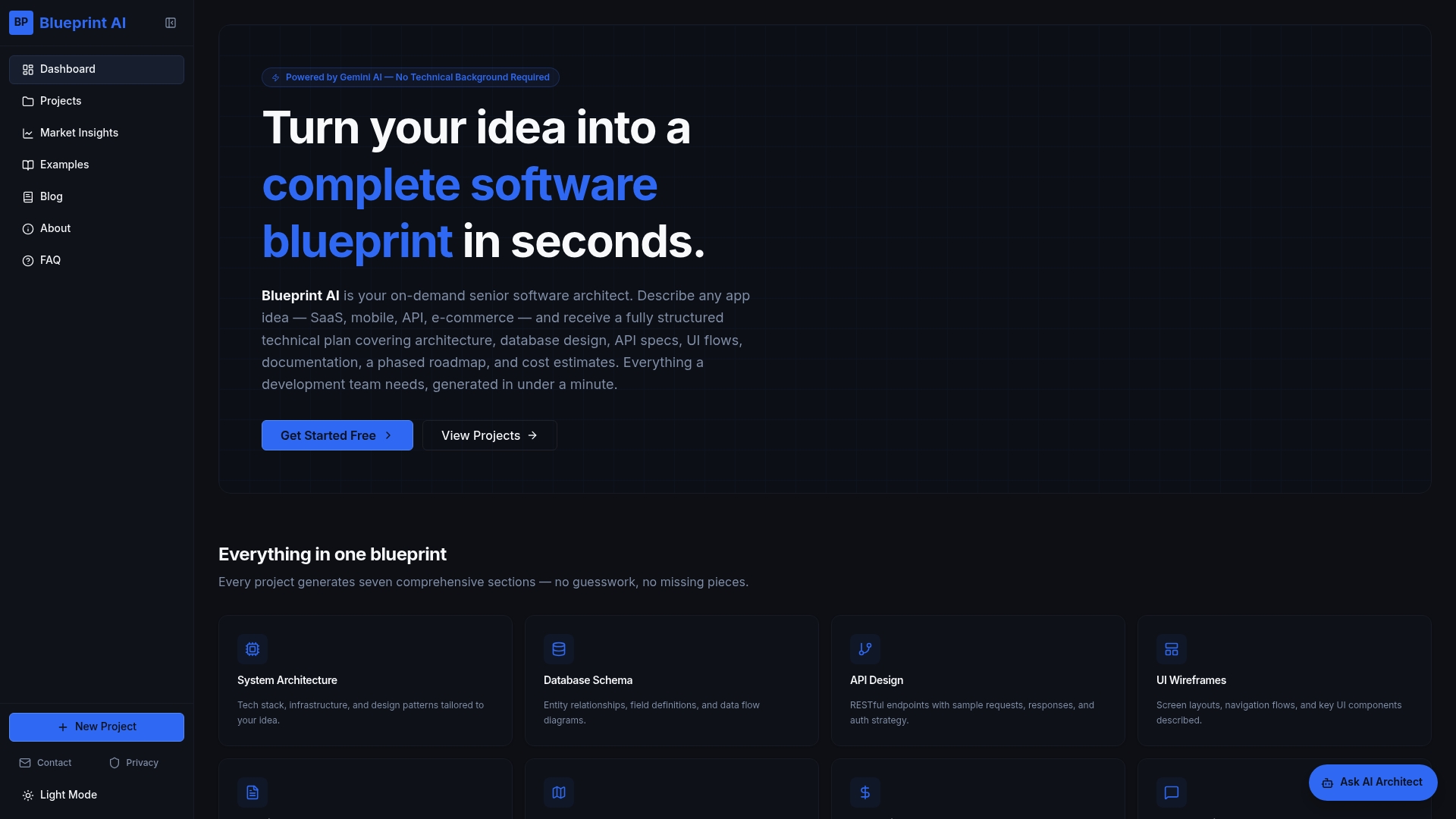
No prior technical knowledge required. See example blueprints to understand exactly what you will receive, or use the free planning tools to start mapping your launch risks right now.
Useful sources and references
- Common App — Why can't I submit?: Documents traffic-spike slowdowns near major deadlines, used to illustrate real-world load failure patterns.
- University of Cincinnati — Common college application mistakes: Admissions guidance on missing required items and sloppy submissions; mapped to app-store metadata and QA process failures.
- Say Hello College — Most common application mistakes: Expert advice on timeline buffers; applied to the recommended 3–6 week pre-launch window.
- Cardinal Education — Common App mistakes: Optional-field and canonical-name guidance; mapped to app-store metadata completeness and data-matching errors.
- CollegeVine — Common App submission troubleshooting: Triage steps for submission failures; adapted into the immediate triage checklist.
- Blueprintbot — Cloud architecture fundamentals: Autoscaling, circuit breakers, and capacity planning guidance for the technical root causes section.
- Blueprintbot — App idea evaluation checklist: Operational checklist and timeline templates for founders; used in the timelines and cost guidance section.
- Blueprintbot — Web application architecture design: CI/CD best practices and reproducible artifact guidance for the pre-launch checklist.
