Mobile app architecture: a 2026 guide for founders

Mobile app architecture is defined as the structural blueprint that organises how an app's components interact, including its user interface, business logic, and data management. The industry term for this concept is "application architecture," and understanding it is the foundation of every successful app project. Mobile app architecture acts as the system of rules coordinating UI, business logic, data management, and network communication across every screen and feature. Whether you are a founder scoping your first product, a product manager briefing a dev team, or a student learning the craft, knowing what is a mobile app architecture separates vague ideas from buildable products.
What is mobile app architecture and why does it matter?
App architecture defines clear boundaries and responsibilities between parts of an app to build scalable, maintainable applications. Think of it as the floor plan for a building. Before a single brick is laid, the architect decides where the walls go, how rooms connect, and where the plumbing runs. Remove that plan, and you get a structure that looks fine at first but collapses under pressure.
The importance of app architecture shows up most clearly when an app grows. A product with 500 users behaves very differently from one with 500,000. Without defined boundaries between components, adding a new feature breaks three existing ones. That is technical debt, and it is expensive to fix after the fact.

Architecture also governs how your app handles failure. A well-structured mobile application structure isolates problems. If the data layer fails to fetch from a server, the UI layer can display a cached result rather than crashing entirely. That kind of resilience is designed in, not bolted on.
What are the main components of mobile architecture?
Every mobile app, regardless of platform, is built on three core layers. Each layer has a defined job, and the layers communicate in a controlled direction.
The Presentation Layer (UI Layer)
The presentation layer is everything the user sees and touches. It renders data on screen and captures user input. Mobile app design principles at this layer focus on keeping the UI "dumb." The UI should display state, not calculate it. Android's architecture guidance recommends using state holders like ViewModels to manage UI state lifetimes, which improves testing and reduces bugs caused by stale data.
The Domain Layer (Business Logic)
The domain layer sits between the UI and data layers. The domain layer is optional and is included only when business logic is complex or reusable across multiple views. A simple to-do app probably does not need it. A fintech app calculating interest across multiple account types almost certainly does. This layer encapsulates rules that belong to neither the screen nor the database.
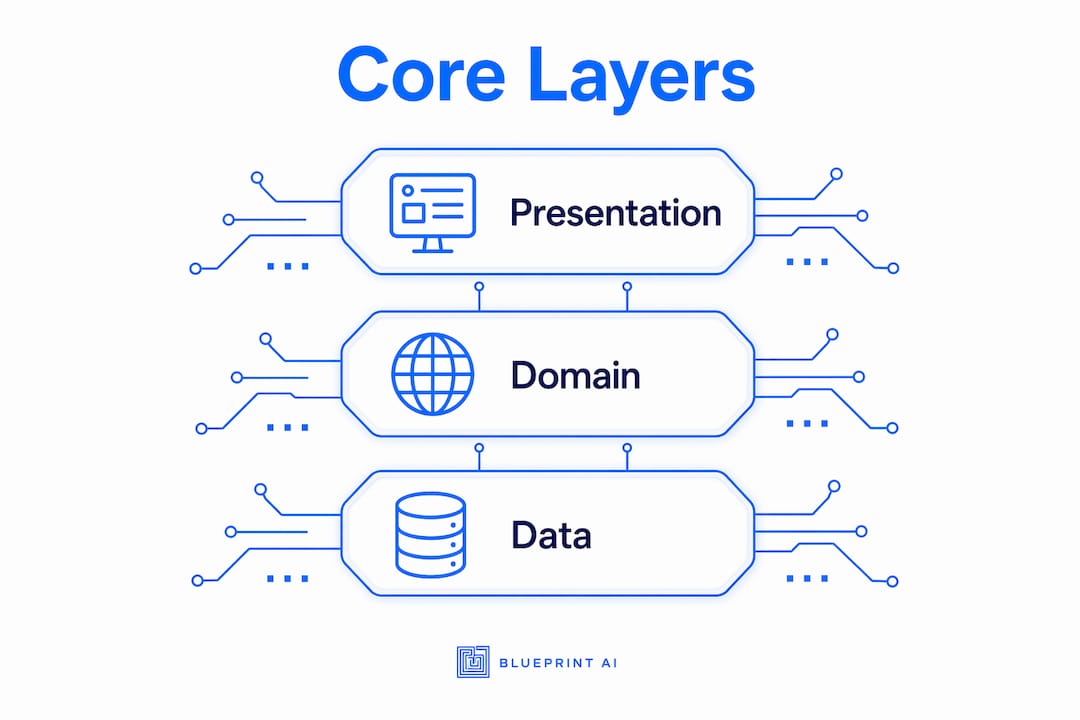
The Data Layer
The data layer manages all data operations: fetching from APIs, reading from local databases, and caching results. It is the single source of truth for the app's state. This layer communicates with backends, handles errors from network calls, and exposes clean data contracts to the layers above it.
Data flows upward from the data layer through the domain layer (when present) to the UI layer. User actions flow downward. This one-way pattern, called unidirectional data flow, keeps state changes predictable and easier to manage across all app layers.
How does architecture enable scalability across devices?
Separation of concerns keeps an app scalable and maintainable beyond any specific coding style or library choice. This principle means each layer does exactly one job and does not reach into another layer's responsibilities. When a layer is self-contained, you can swap out its implementation without touching the rest of the app.
Device diversity makes this even more critical in 2026. Scalable architecture adapts beyond initial device assumptions, supporting phones, tablets, foldables, ChromeOS, and XR devices. An app built with rigid, tangled layers cannot adapt to a foldable screen's dual-pane layout without a near-complete rewrite. An app built with clean layer separation can add a new UI configuration without touching the business logic or data layers at all.
State management is the other half of the scalability story. Unidirectional data flow and state holders make state changes predictable and easier to manage across all app layers. When the ViewModel is the single source of truth for what the UI renders, you always know where to look when something goes wrong. Debugging becomes a matter of tracing one path, not hunting through tangled callbacks.
Pro Tip: Treat your ViewModel as the single source of truth for UI rendering. If two parts of your UI show conflicting data, the problem is almost always a state holder that is being bypassed.
Long-term maintainability depends on this discipline. Teams that enforce layer boundaries spend less time on regression bugs and more time shipping features. That is not a philosophical point. It is a measurable outcome on every project that respects mobile architecture design patterns from the start.
Architecture vs. tech stack: what is the difference?
Founders and product managers frequently conflate architecture with the tech stack. They are related but distinct concepts, and mixing them up leads to poor decisions. Mobile app architecture is distinct from the mobile tech stack: architecture defines structure and behaviour, while the stack refers to the specific technology frameworks and tools used to build it.
The table below makes the distinction concrete.
| Dimension | Mobile App Architecture | Mobile Tech Stack |
|---|---|---|
| Definition | Rules, patterns, and structural design of the app | Languages, frameworks, and tools used to build it |
| Examples | Layered architecture, MVC, MVVM, Clean Architecture | Swift, Kotlin, React Native, Flutter, Firebase |
| Changes when? | Rarely, only when system needs fundamentally shift | Frequently, as better tools emerge |
| Who decides? | Architects, senior engineers, product leads | Engineering team, based on skills and constraints |
| Primary concern | How components interact and data flows | How code is written and which libraries are used |
A practical example: two apps can share the same layered architecture but use completely different tech stacks. One is built in Kotlin for Android, the other in Swift for iOS. The architectural decisions, where the business logic lives, how data flows, how state is managed, are identical. The implementation languages are not.
For founders, this distinction matters when briefing a development team. Describing your app in terms of architecture gives engineers the freedom to choose the best tools for the job. Prescribing a specific stack without architectural clarity often results in a product that works today but cannot scale tomorrow. Blueprintbot's tech stack finder helps you separate these two decisions cleanly.
How should founders plan mobile app architecture?
Planning app architecture before writing a single line of code is one of the highest-leverage activities available to a non-technical founder or product manager. The goal is not to produce a perfect technical document. The goal is to define system boundaries and data flow clearly enough that your engineering team can build without constant clarification.
Follow these steps to plan effectively:
- Define your core data entities. List the main objects your app manages: users, orders, messages, products. These become the foundation of your data layer design.
- Map the data flow. For each key user action, trace where data comes from, how it is transformed, and where it is displayed. This exercise surfaces integration points and dependencies early.
- Identify reusable business logic. If the same calculation or rule appears in more than one screen, it belongs in a domain layer. Flag these early so your team designs for reuse.
- Sketch your layer boundaries. Draw a simple diagram showing the three layers and the arrows between them. You do not need a formal tool. A whiteboard photo works.
- Document data contracts, not implementations. Architecture decisions should focus on data flow contracts rather than specific frameworks to keep boundaries stable as technology evolves. Write what data moves between layers, not which library handles it.
Pro Tip: Before your first engineering meeting, produce a one-page architecture diagram showing your three layers and the main data flows between them. Engineers will spend the meeting refining it rather than starting from scratch, which saves days of back-and-forth.
Blueprintbot's guide on planning app architecture walks through this process in detail, with examples suited to founders who are not writing the code themselves. A scalable architecture roadmap takes this further, covering how to plan for device diversity and feature growth from day one.
Key takeaways
Mobile app architecture is the structural blueprint that determines whether your app scales gracefully or accumulates technical debt with every new feature.
| Point | Details |
|---|---|
| Architecture is a blueprint | It defines how components interact, not which tools build them. |
| Three core layers | Presentation, domain, and data layers each have distinct, non-overlapping responsibilities. |
| Separation of concerns scales apps | Clear layer boundaries let you add features and support new devices without breaking existing functionality. |
| Architecture differs from tech stack | Architecture defines structure and behaviour; the stack defines the tools used to implement it. |
| Plan data flow first | Defining data contracts before coding keeps boundaries stable as technology choices evolve. |
Architecture is the decision you cannot undo
Most founders I have worked with treat architecture as a developer concern. They focus on features, design, and go-to-market, then hand the technical brief to an engineer and hope for the best. That approach works until it does not, and when it fails, it fails expensively.
The uncomfortable truth is that misinterpreting architecture as purely code-level structure leads directly to problems in scalability and maintainability. I have seen products rebuilt from scratch at the Series A stage because the original architecture could not support the load or the feature set the business needed. That is not a coding failure. It is a planning failure.
What I tell every founder and PM I work with is this: you do not need to understand Kotlin or Swift to have an informed opinion on your app's architecture. You need to understand where your data lives, how it moves, and who is responsible for each transformation. That is a product question, not an engineering question.
Students learning this material often get distracted by the debate between MVC, MVVM, and Clean Architecture. Those patterns matter, but they are secondary to the principle underneath them all: a strong architecture is more about separation of responsibilities than the choice of external libraries or coding styles. Get the responsibilities right first. The pattern choice follows naturally.
The best investment you can make before your first sprint is a clear, shared understanding of your app's layers and data flow. It costs nothing but time, and it saves everything else.
— Rishi
Plan your app architecture with Blueprintbot
Understanding architecture principles is the first step. Translating them into a concrete plan for your specific app is where most founders get stuck.

Blueprintbot generates complete software blueprints from your app idea in seconds, covering system architecture, data layer design, API structure, and UI flows. You do not need coding skills to produce a document your engineering team can build from. Explore worked blueprint examples to see exactly what a well-structured mobile app architecture looks like in practice, from a news aggregator to a crowdfunding platform. If you are ready to move from concept to specification, Blueprintbot is the fastest path from idea to a buildable plan.
FAQ
What is mobile app architecture in simple terms?
Mobile app architecture is the structural blueprint that defines how an app's components, including its UI, business logic, and data management, are organised and how they communicate with each other.
What are the three main layers of mobile app architecture?
The three core layers are the presentation layer (UI), the domain layer (business logic), and the data layer. Each layer has distinct responsibilities and communicates with adjacent layers through defined contracts.
Is the domain layer always required?
No. The domain layer is optional and is only included when business logic is complex or needs to be reused across multiple views, as noted in Android's architecture guidance.
How is mobile app architecture different from a tech stack?
Architecture defines the structural rules and data flow of an app, while the tech stack refers to the specific languages, frameworks, and tools used to build it. Two apps can share the same architecture but use entirely different tech stacks.
Why should founders care about app architecture?
Founders who understand architecture can communicate system boundaries and data flow clearly to their engineering teams, which reduces ambiguity, prevents costly rebuilds, and keeps the product scalable as it grows.
